Bad Unicorn: A Handwriting Font That Makes a Bold Statement
If you're looking for a font that stands out, Bad Unicorn is a name worth knowing. This unique handwriting font brings a sense of personality and flair to any text it touches. Designed with creativity in mind, Bad Unicorn isn’t just another typeface—it's a statement. Whether you're crafting social media posts, designing logos, or writing personal notes, this font adds an artistic edge that can transform your content.
What Is Bad Unicorn?
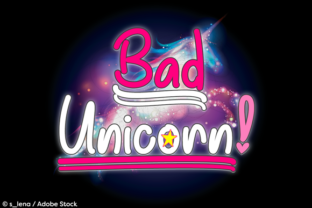
Bad Unicorn is a stylized handwriting font that mimics the look of someone’s actual cursive writing but with a twist. It has a playful yet bold appearance, making it ideal for creative projects. One of its standout features is the inclusion of PUA encoded symbols such as hearts, stars, alternate exclamation and question marks, and stylish underlines in various lengths. These elements allow users to add visual interest and emphasis without needing additional graphic tools.
When and Where to Use Bad Unicorn
Bad Unicorn shines in situations where a more traditional font might feel too plain or corporate. Think about using it for:
- Social Media Posts: Add a touch of whimsy to your Instagram captions, Facebook updates, or Twitter threads.
- Personalized Invitations: Create wedding invites, birthday cards, or event announcements with a hand-written charm.
- Blog Headers and Titles: Make your blog stand out with a unique title that grabs attention immediately.
- Logo Design: Incorporate Bad Unicorn into your brand identity for a memorable and eye-catching look.
- Marketing Materials: Use it on flyers, posters, or promotional banners to create a distinctive visual appeal.
The versatility of Bad Unicorn makes it suitable for both digital and print formats. Its design works well on screens and paper alike, ensuring that your message remains clear and impactful across different mediums.
How to Use Bad Unicorn Effectively
Using Bad Unicorn is straightforward, but there are a few tips to ensure you get the best results. First, select the underline swash you want before typing the word. Tying the underline first will place it under the word automatically. If you’re working with software that supports layers, you can type or select the underline on another layer to manually position it exactly where you want it.
This feature gives you control over how your text appears. You can experiment with different underlines to match the tone and style of your project. For example, a longer underline might be better suited for headings, while shorter ones could work well for highlighting key points in body text.
Real-World Applications of Bad Unicorn
Let’s explore some practical scenarios where Bad Unicorn can make a real difference:
For Bloggers and Content Creators
Bloggers often struggle with finding a font that feels both professional and engaging. Bad Unicorn offers a perfect middle ground. Using it for headlines or call-out boxes can help break up long paragraphs and draw readers’ attention to important sections. The included symbols like hearts and stars can also be used to highlight quotes or testimonials, adding a personal touch to your content.
For Small Business Owners
Small businesses need to stand out in a crowded market. Bad Unicorn can be a great tool for creating eye-catching signage, packaging, or promotional materials. Imagine a coffee shop using Bad Unicorn for their menu board or a boutique using it for custom gift tags. These small details can leave a lasting impression on customers.
For Educators and Teachers
Teachers looking to make learning more interactive can benefit from using Bad Unicorn in classroom materials. It can be used to create fun worksheets, flashcards, or even student certificates. The playful nature of the font can help make educational content more approachable and enjoyable for students.
For Freelancers and Designers
Freelancers and designers can use Bad Unicorn to add a unique flair to client presentations, proposals, or website designs. It’s especially useful for clients who want something different from the standard sans-serif or serif fonts. The ability to customize underlines and include special symbols makes it easy to tailor the font to specific needs.
Considerations Before Using Bad Unicorn
While Bad Unicorn is versatile and expressive, it’s important to consider a few factors before using it in your projects. First, ensure that the font is compatible with your design software or platform. Some programs may require additional plugins or support for PUA encoded characters.
Also, think about readability. While Bad Unicorn is visually appealing, it may not be the best choice for large blocks of text. Reserve it for headings, titles, or short phrases where its character can shine without overwhelming the reader.
Lastly, consider the audience you're targeting. Bad Unicorn is best suited for creative, younger, or niche audiences. If your project requires a more formal or professional tone, you may want to pair it with a more traditional font for balance.
Bad Unicorn is more than just a font—it’s a creative tool that can elevate your projects and leave a lasting impression. Whether you're a blogger, designer, educator, or small business owner, incorporating this unique font into your work can help you stand out in a sea of ordinary content. So go ahead, give Bad Unicorn a try, and let your words speak with style.